
Recruitment Video Outreach: A Candidate Workflow for Recruiters
By Ryane Tully · November 2, 2026

Recruitment video outreach is a short, optional recruiter-to-candidate message tied to a specific role or process step. Use it when video adds human or visual context that text cannot deliver as well. Keep the role facts, recruiter identity, next step, and response options in writing. Candidate history, communication preferences, hiring stages, and outcomes stay in the recruiting system that already owns them.
Use it when: one focused candidate segment shares a specific role and a clear reason for contact. The video also gives them something useful to see or hear.
Skip it for: generic blasts, invasive details, and sensitive decisions. Skip it when the written note already does the whole job.
What recruitment video outreach means
A recruiter sends an optional video to a potential or active candidate. It introduces a role or adds context to one recruiting step. Employer-brand films, applicant pitches, recorded interviews, and staffing sales videos are separate formats. Those formats solve different problems and need different workflows.
| Format | Sender → recipient | Job | Where to go next |
|---|---|---|---|
| Recruiter-to-candidate video outreach | Recruiter → potential or active candidate | Introduce a role or add context to a recruiting step | This guide |
| Recruitment marketing video | Employer → broad candidate audience | Present the employer brand, workplace, or role family | Employer-brand workflow |
| Video interview or assessment | Candidate ↔ employer or panel | Capture a candidate response for evaluation | Interview process |
| Staffing-agency client prospecting | Recruiter or agency → hiring company | Win a commercial client | Video prospecting workflow |
| Applicant video to a recruiter | Job seeker → recruiter or employer | Submit an application, portfolio, pitch, or interview response | Applicant process |
This page covers recruiter-to-candidate communication. A recruiting outreach video from an agency to a hiring manager is sales outreach. If a candidate has been asked to record an answer, that is an interview or application workflow.
Where video helps in the recruiting process
Video earns its place when watching is useful. That may be a recruiter introduction or a hiring manager’s welcome. It could show the team’s work or explain a key change since the last conversation. It should never become a tollbooth in front of the information the candidate needs.
| Stage | Verdict | Useful video job | Facts and actions that stay in text | Main risk | System that owns the next state |
|---|---|---|---|---|---|
| Passive sourcing | Use selectively | Introduce the recruiter, role, team, or work with a job-related reason for contact | Role title, location or work arrangement, sender identity, role link, reply and decline routes | Generic blasts or invasive personalization | Recruiting system or recruiter record |
| Follow-up after interest | Good fit | Add a hiring-manager introduction, team context, or a useful process update | Promised material, action, dates, contact route | Repeating the first message without adding value | Recruiting system and mailbox |
| Interview reminder or context | Optional | Share preparation context or a human welcome | Date, time zone, format, participants, rescheduling, and alternative-format route | Hiding logistics inside the recording | Scheduling and recruiting systems |
| Re-engagement | Use when something changed | Explain a material change in scope, location, seniority, timing, or team | The changed facts and response options | Ignoring previous preferences or contact history | Recruiting system |
| Rejection, assessment, or sensitive decisions | Do not use | None | Use the organization’s established written and human process | Turning a high-stakes decision into tracked prospecting media | Recruiting and HR process |
Views and watch time belong to the video layer. They do not tell you whether a candidate is suitable, motivated, serious, or interested. The recruiting record and the candidate’s actual response carry that meaning.
The seven-step recruitment video outreach workflow
The best recruiter videos come from a narrow list, not a clever script. Build around one role, write the useful details first, and record only when the video gives the candidate something extra. If half the rows need a different explanation, split the list before you touch the camera.
1. Select one role and one candidate segment
A useful segment might be “senior backend engineers with recent payments-platform experience for the London hybrid Staff Backend Engineer opening.” A weak segment is “people who might fit our engineering jobs.” The first supports one role story; the second produces a generic company introduction.
| Example input | Example output |
|---|---|
| Role: Staff Backend Engineer; team: Payments Platform; work arrangement: London hybrid; reviewed reason: recent ownership of payment infrastructure | Candidate segment whose members can receive the same base recording |
Before anyone records, check each person’s contact history and the reason they belong in this segment. Hold a row when the role is stale, the reason is missing, or the candidate has already declined similar contact. Split the list when the spoken pitch would need a different role, team, or work setup.
2. Choose the minimum useful inputs
Keep a working sheet with the candidate’s name and email, the company or page you want to show, the exact role, the role link, the work setup, and a job-related reason for contacting them. Add the recruiter identity and reply route to the message template.
Then delete the decorative data. Private-life details, guessed motives, salary guesses, inferred rank, and copied profile paragraphs do not make a message feel researched. They make it feel watched. If a field does not change the written message, the background, or a send/hold decision, leave it out.
3. Give the recording and written message different jobs
Write the email before the script. The email names the role, work setup, recruiter, company, role link, and next step. It also gives the candidate a simple way to reply, decline, state a preference, or ask for the details in another format.
Now give the video the part that benefits from a person or a visual: why the team is hiring, what the work looks like, or a hiring manager’s welcome. Read the two pieces together. If the email makes no sense without pressing play, put the missing facts back into the email. If the video merely repeats the email, cut the video.
4. Record one pitch for the whole segment
In Pitchlane, the recruiter records the talking-head pitch once. That face-and-audio recording stays identical across the segment. A dynamic background can show the website or link supplied for each record. The video title and written message can use mapped fields such as the candidate’s first name.
Do not script a candidate’s name into a reusable recording. Do not write “I made this video just for you” when the recruiter recorded one pitch for the segment.
Watch the master once as if you were the least obvious candidate in the segment. If the role changes or a claim only fits part of the list, hold the campaign and record a narrower version.
5. Review normal rows and failure cases
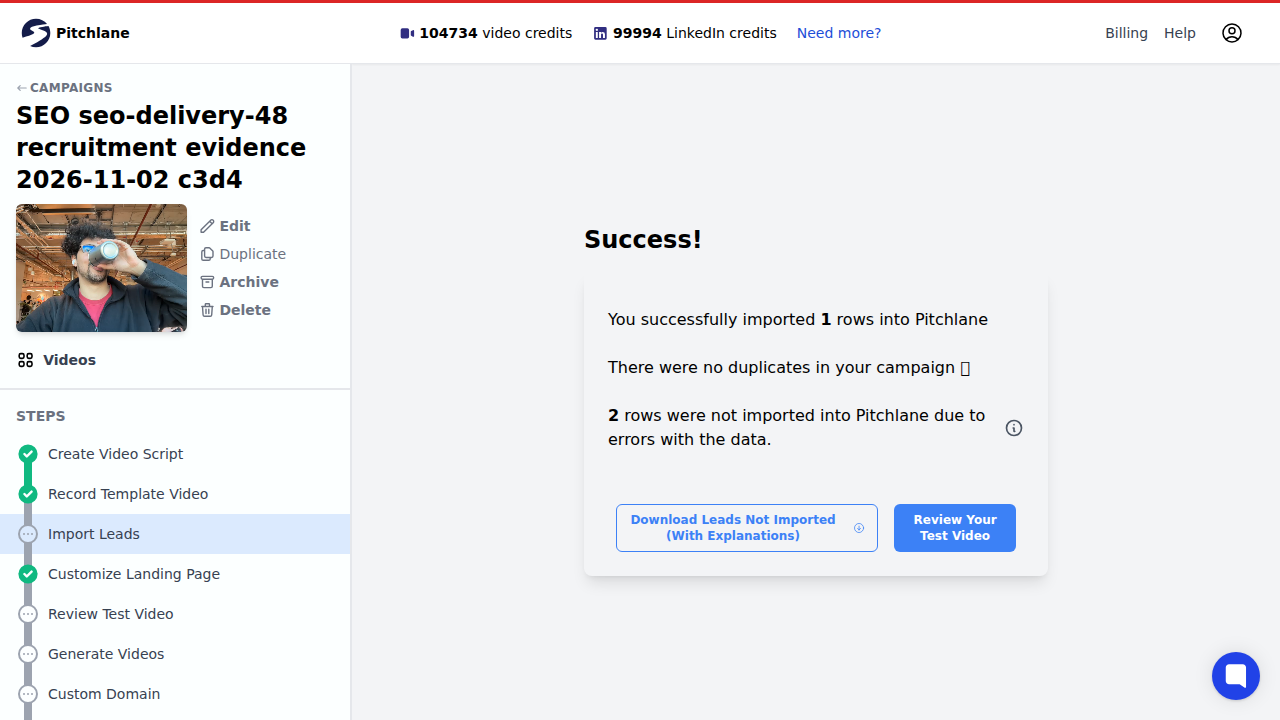
Import one ordinary record plus a couple of deliberately bad website values. Pitchlane should accept the usable website and reject malformed values. That is the product check.
The recruiter still has a separate job: open the current role URL, check the destination shown behind the video, read the full message in context, and hold any stale role. Also check the title, creator line, captions or transcript, and narrow-screen layout. An import can validate a URL shape; it cannot decide whether the job behind that URL is still the right job.
Do not release the batch with raw merge tags, wrong names, stale jobs, broken destinations, or unreadable text. One clean preview proves one clean preview. The rejected rows tell you whether bad inputs are being stopped.
6. Hand reviewed assets to the communication system
Pitchlane produces the personalized-video assets and can hand them into supported outreach workflows. The mailbox, recruiter seat, or communication platform controls enrollment, timing, delivery, suppression, and replies. The recruiting system keeps the candidate history and current stage.
Compare the reviewed list with the list about to send. Hold the handoff if rows changed, the sender is wrong, or replies and declines will not reach the recruiting record. A rendered asset is ready to use; it is not permission to contact every row attached to it.
7. Follow up from the candidate’s actual state
A candidate reply, decline, request, or stated preference changes the next step. A video view does not. Views show whether the asset was opened and may flag format problems. The candidate’s reply and recruiting record decide what happens next.
Stop automated follow-up when the candidate declines, states a preference, enters another stage, or needs an individual reply. Never send “I saw you watched my video.” If you follow up, add a useful role detail and let the candidate answer on their terms.
What data should personalize a recruiter video?
Good detail answers “why this role, why this person, why now?” with accurate facts about the job. It does not raid a person’s life for decorative details. Start with the field’s job. Then put it in the written note, landing page, background, or nowhere.
| Field | Useful job | Example | Keep out |
|---|---|---|---|
| First name | Written greeting, title, or page context | Maya | Guessed identity information |
| Exact role title | Name the opening | Staff Backend Engineer | Vague “exciting opportunity” copy |
| Team or function | Give the role useful context | Payments Platform | Internal labels the candidate cannot understand |
| Job-related reason | Explain why the role may be relevant | Recent ownership of payment infrastructure | Inferred motivation, suitability, or “culture fit” |
| Role URL | Give a durable source for details | jobs.example.com/staff-backend-engineer | Misleading or hidden destinations |
| Location or work arrangement | State a material constraint | London hybrid, two team days | Guesses about where the person lives or will move |
| Recruiter identity and company | Make the sender clear | Noah Bell, Northstar Labs | Ambiguous team aliases with no accountable sender |
| Reply, decline, preference, or alternative route | Give the candidate control over the next step | Reply by email or request the details as text | A video-only action |
The ICO’s data-minimisation guidance says personal data should be adequate, relevant, and limited to what is necessary. The EEOC’s Prohibited Employment Policies/Practices guidance covers discrimination in recruitment and other employment decisions. For this workflow, if a field does not improve the defined candidate message, remove it.
A complete personalized recruiter video example
Here is the workflow with invented people, an invented company, and one role. The useful split is simple: Pitchlane handles the mapped video fields and rendering; the recruiter decides whether each role, destination, and message is fit to send.
The role and segment
- Company: Northstar Labs
- Role: Staff Backend Engineer, Payments Platform
- Work arrangement: London hybrid
- Segment: engineers whose reviewed work history includes ownership of payment infrastructure
- Useful visual: the role page and a public engineering page explaining the payments platform
Input specification
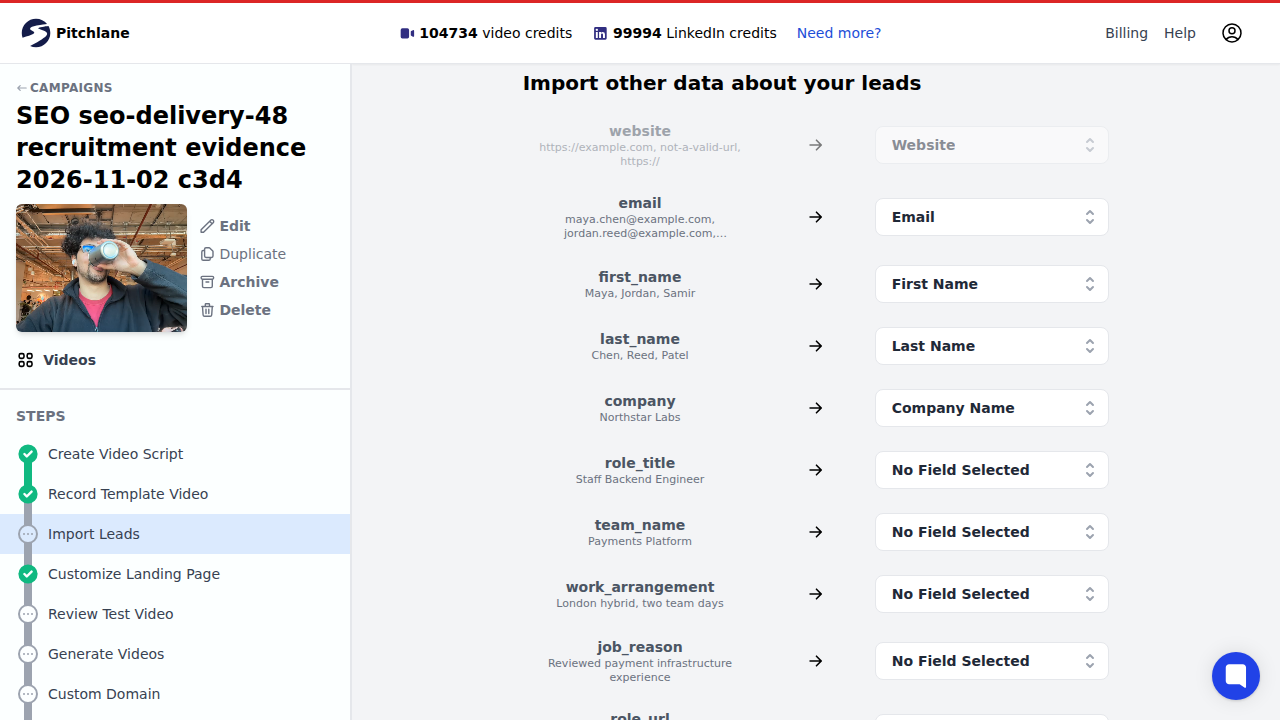
The recruiter’s working sheet carries the role context needed to write and review the outreach. The Pitchlane import only maps the fields needed for this video setup.
| Mapped Pitchlane field | Job in this example |
|---|---|
website | Load the dynamic Company Website background page |
email | Identify the recipient record |
first_name | Personalize the video title |
last_name | Keep the imported recipient record complete |
company_name | Carry the company value into the imported record |
The working sheet also contains role_title, team_name, work_arrangement, job_reason, role_url, and reply_route. Those fields guide the script, email, and recruiter review. They were intentionally left unmapped in Pitchlane, so the example does not rely on the import to place or approve them.
Base spoken pitch
Hi, I’m Noah from Northstar Labs. We’re hiring a Staff Backend Engineer for the team that owns our payments platform. I wanted to give you a quick look at the work and explain why we’re building the team now. The role details and London hybrid setup are in the message beside this video. If the scope is relevant, reply and I’ll send the full team overview or arrange a short conversation.
The script does not say the candidate’s name. It does not pretend the recording was made one-to-one. It stays true for every person in the segment.
Written email wrapper
Subject: Staff Backend Engineer — Payments Platform
Hi Maya,
I’m Noah Bell, a recruiter at Northstar Labs. I’m contacting you about our Staff Backend Engineer role because your recent work includes ownership of payment infrastructure.
I recorded a short introduction to the team and the work: {{video_link}}
The role is London hybrid with two team days each week. You can read the full description here: {{role_url}}.
If it looks relevant, reply and I’ll send the team overview or arrange a short conversation. If it is not for you, you can say so here or share a contact preference. You can also ask for the same details in another format.
Noah Bell Northstar Labs
Candidate landing-page context
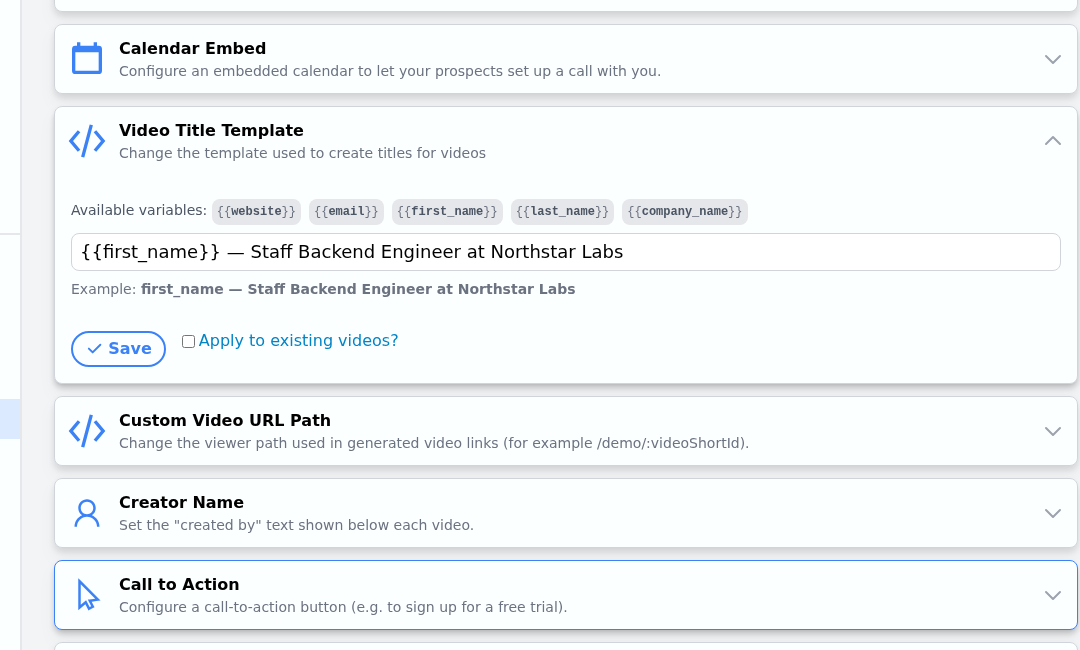
For this campaign, website feeds the dynamic Company Website page. The available title variables are website, email, first_name, last_name, and company_name. The title template is {{first_name}} — Staff Backend Engineer at Northstar Labs: the first name changes by record, while the role phrase stays fixed for the whole campaign. The creator line is also a static campaign setting.

What Pitchlane accepted and what the recruiter must hold
| Fictional row | Website import result | Recruiter decision before send |
|---|---|---|
| Maya Chen | Valid website; imported | Check the current role URL, background destination, written message, and reply route |
| Jordan Reed | not-a-valid-url; rejected | Fix the website value before another import |
| Samir Patel | https://; rejected | Keep on hold because the linked Data Engineer role is closed, even after the website value is fixed |
| Elena Rossi | Not uploaded | Remove the guessed medical-condition field from the working file |
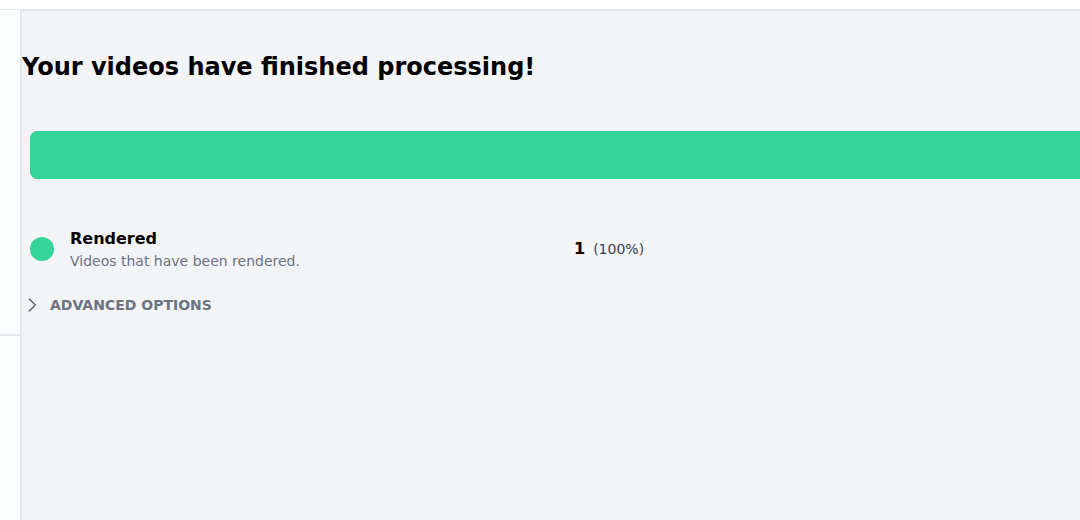
Pitchlane imported the valid website row and rejected the two malformed website values. One video then finished processing: 1 rendered, 100%. Before that row can be sent, the recruiter separately checks the current role, destination, message context, and response path.
Follow-up by observable state
| State | Useful next move | Avoid |
|---|---|---|
| No recorded view and no reply | Send one short text follow-up with the role, reason for contact, and role link | Resending the same unexplained video link |
| View recorded, no reply | Follow up with one new role or team detail | Mentioning that the candidate was tracked or treating the view as interest |
| Positive reply | Continue in the recruiter’s normal process and record the new state | Keeping the person in a generic campaign |
| Decline or preference stated | Update the owning system and stop the relevant follow-up | Asking the candidate to repeat the preference elsewhere |
Short re-engagement example
Subject: Update to the Payments Platform role
Hi Maya,
We spoke earlier about Northstar Labs. I’m reaching out because the Staff Backend Engineer role has changed from office-first to London hybrid with two team days. I recorded a 40-second update from the hiring manager: {{video_link}}
The revised description is here: {{role_url}}. If the new setup changes your interest, reply here. If it does not, tell me how you would prefer us to handle future contact.
Noah
Re-engagement needs a material change. “Just circling back” is not one.
The final send-or-hold review
Open the final email and video for one normal candidate, then work down this list. Every check should end in a clear decision. If nobody knows whether a failure stops the send, the check is theatre.
| Check | Send when | Hold when |
|---|---|---|
| Candidate and role | The role is open, the reason for contact is job-related, and contact history allows the message | The role is stale, the reason is missing, or the candidate has already declined or stated a conflicting preference |
| Working data | Every field has a job in the message, background, or handoff | The file contains sensitive, inferred, decorative, or unrelated details |
| Written message | The role, work setup, sender, link, next step, and response options make sense without playing the video | Essential facts or actions are trapped inside the recording |
| Video and page | The pitch fits the whole segment; the name, title, background destination, creator line, and captions are correct | A merge tag is raw, a destination is wrong, the role conflicts with the recording, or the page is unreadable on a narrow screen |
| Sending handoff | The final recipient list matches the reviewed list, the sender is right, and replies or declines update the recruiting record | Rows changed after review, the sender is unclear, or candidate state will be lost |
| Follow-up | Replies and stated preferences change the next step | A view is being used as a hiring signal or as an excuse for “I saw you watched” copy |
W3C’s captions guidance explains that captions need to carry the speech and relevant non-speech audio required to understand the video. Check them against the final recording, not the script you meant to read.
How Pitchlane fits video outreach for recruiters
Pitchlane is the personalized-video asset and handoff layer. A recruiter records one pitch for a focused segment and imports the reviewed records. They set up the landing page and review a test video. Then they pass the link, thumbnail or GIF, title, and page into a connected workflow.
The presenter’s face, words, and audio stay the same across the segment. Dynamic background pages can show the website or link supplied for each record. Names and similar fields belong in the written message, video title, and page context. The recording does not speak each candidate’s name.
The recruiting system continues to own candidate state, communication controls, and hiring outcomes. The mailbox or outreach workflow owns sending and replies. Pitchlane records video views so the team can see whether an asset was opened. That event is not a hiring signal.
For a broader production comparison, see the video prospecting tools guide. For segmentation, field selection, exceptions, and handoff design beyond recruiting, use the personalized outreach at scale workflow. Pitchlane’s privacy policy covers Pitchlane’s own data practices.
What should recruiters measure?
Track the point where the workflow breaks, then fix that point. Delivery problems belong to the sender. Bad website values belong to the source file. Candidate replies belong to the recruiting record. A video view only says that the asset was opened.
| Signal | Read it in | What to do with it |
|---|---|---|
| Delivery or failure | Sending platform or mailbox | Fix addresses, sender setup, or enrollment before changing the video |
| Video view or watch event | Video layer | Check link placement, thumbnail, and page experience; do not label the candidate interested or suitable |
| Reply, decline, or preference | Mailbox, recruiter seat, or recruiting system | Update the candidate state and stop or change follow-up |
| Stage movement | Recruiting system | Judge the recruiting process using the team’s existing stage definitions |
| Rejected import rows | Import workflow | Correct the source field or remove the row before rendering |
| Review and handoff time | Team workflow | Remove fields and checks that never change a send-or-hold decision |
Suppose 100 messages are delivered, 22 videos are opened, four candidates reply, and two book a call. The 22 views tell you the asset was accessed. The four replies tell you the outreach started a conversation. The two calls tell you what happened next. Do not turn the other 18 views into imaginary intent.
Change one controllable variable at a time: the segment, opening reason, video format, written wrapper, or next step. If you change all five, the next batch teaches you nothing.
Build the written message first
Pick one role and one coherent candidate segment. Draft the written message before you record anything. Then decide whether a human introduction, team page, or hiring-manager context earns the extra click. Build a fictional test file. Review an ordinary row and the ugly exceptions. Then hand the assets to the system that controls candidate contact.
Try Pitchlane when one recruiter pitch fits the segment. The background, landing page, title, and written message can still feel specific to each candidate.